

Track and cancel a driver's subscription
See where a customer's subscription stands from their driver profile, check whether their payments are up to date, and cancel it at their request.
A subscriber comes to the front desk to ask where their subscription stands, or to end it. Their driver profile gives you its status, what they have left to play, and the button to cancel.
See a driver's subscription
Open the driver's profile
In NEXUS, open Drivers, find the customer, then open their profile. See Find a driver.
Read the Subscription block
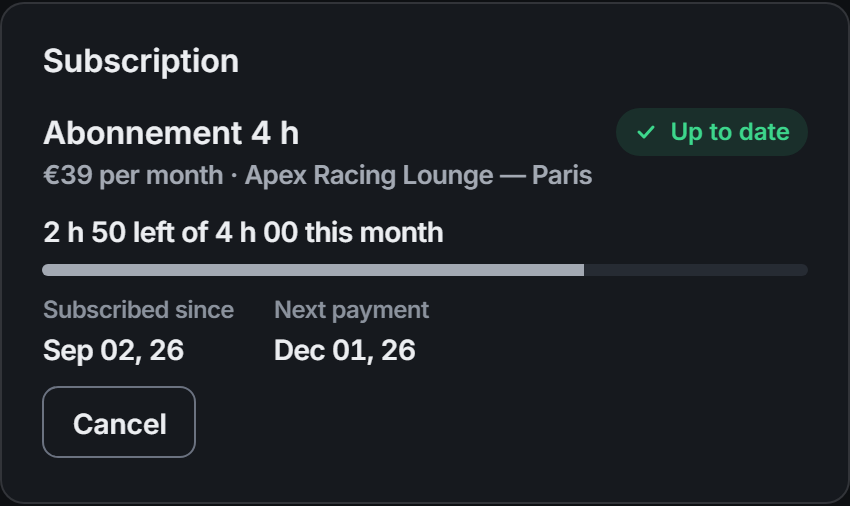
The Subscription block gives the plan, its price per month, the center, and its status:
| Status | What it means |
|---|---|
| Up to date | The current month is paid. |
| Payment late | The last payment failed. Access stays open until the Access open until date, 7 days after the due date. |
| Suspended | The payment is more than 7 days late. The simulator refuses the QR code. |
| Cancelled | The subscription is cancelled; access stays open until the Access ends date. |
| Ended | The subscription has ended. |
Below, what is left to play, for example "3 h 50 left of 4 h 00 this month", then Subscribed since and Next payment.
Cancel a subscription
Request the cancellation
In the Subscription block, click Cancel.
Confirm
The Cancel this subscription? window reminds you what will happen: the plan stays usable until the end of the paid month, no further payment is taken, the current period is not refunded, and the driver is notified by email.
Click Cancel subscription, or Keep the subscription to back out.
Result
The block shows Cancelled, the Access ends date, and the line "Cancelled by … on …" with your name. The customer receives the email "Your … subscription is cancelled".
Their QR code works until the Access ends date. After that, the simulator shows "This subscription has ended."
Good to know
- A cancellation made from NEXUS cannot be undone. The customer cannot resume a subscription you have cancelled themselves: they must take out a new one.
- The customer can cancel on their own, from their driver area. The profile then shows "Cancelled by the driver on …". As long as their month is not over, they can change their mind.
- Cancellation refunds nothing. To refund a month, see Track and refund a payment. A refund does not cancel the subscription and does not cut off access.
- A subscription given as a gift appears on two profiles: "Given to …, who uses it" on the profile of the person who pays for it, "Given by …, who pays for it" on the profile of the person who uses it. You can cancel it from either one; the payer receives the cancellation email, and the recipient is told the end date. See Sell a ticket as a gift.
- Each paid month is a line in Transactions. An unpaid month creates none.
- "Cancelled automatically on …, after 30 days unpaid": the subscription stayed suspended for 30 days without payment.
- "Cancelled from Stripe on …": the cancellation was made in your Stripe dashboard.
Troubleshooting
| Symptom | Cause | Solution |
|---|---|---|
| The Subscription block does not appear | The driver has no subscription in the selected centers, or your account does not have the View subscriptions permission. | Check the selected centers, then your permissions with an administrator. |
| The Cancel button does not appear | The subscription is already cancelled or ended, or your account does not have the Cancel a subscription permission. | Check the status shown, then your permissions. |
| "The cancellation did not go through. Try again." | The request did not reach Stripe. | Try again. If this persists, cancel from your Stripe dashboard. |
| The customer says they have paid, the profile shows Payment late | The payment is not recorded yet. | Reload the profile after a few minutes. |